




 Indietro











Passwords have been employed by many since the days of the Roman Empire, and they quickly became omnipresent as we approached the digital age. However, rapid changes in the security landscape have forced us to evolve what our passwords look like and how they are used. At times, this has led to conflicting advice and confusion on what proper password management looks like. By clarifying how to best create and use passwords, we can make it easier for people to stay safe online.
With that in mind, as a part of Cybersecurity Awareness Month, I am going to answer some of the questions you may have when it comes to passwords.
Is it better to have a long password or a complex password?
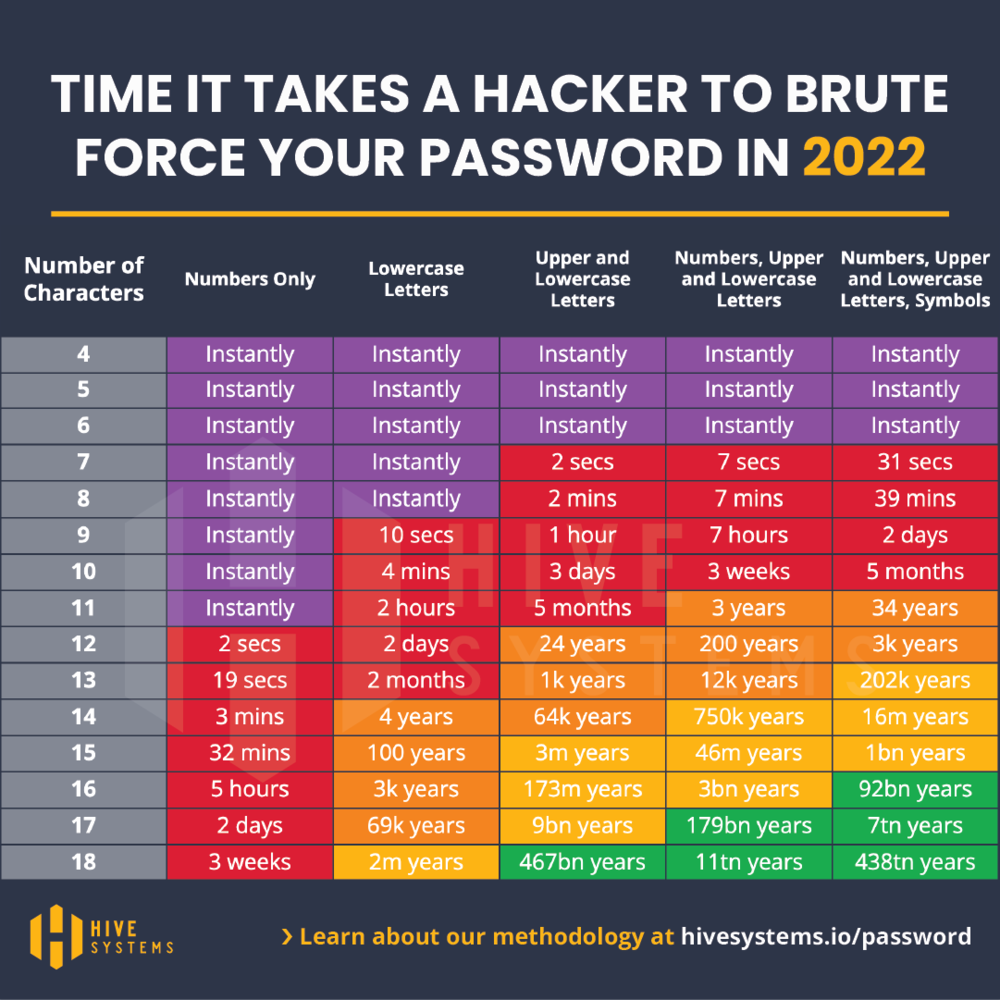
A few years ago, you may have been told that if you want to make your password game better, you need to start using complex passwords. Using mixed-case characters, numbers, and special characters makes your password less guessable to a human, which used to be enough, but with machines that’s a different story. In 2012, a nine-character password with numbers, mixed-case letters, and symbols would take 12 years to crack. In 2022 though, that same password can be deciphered in two days. And if you are just like everyone else and replace your “a” with “@” and your “s” with “$”, your password is very likely already in a dictionary, increasing the likelihood of an attacker figuring out your password.
When comparing these two password attributes there is not one clear winner. The best passwords are longer while still being complex. As we can see with the table below from Hive Systems, even complex passwords can be cracked in nearly no time if they are shorter than 10 characters. Contrarily, a full-lowercase password that is 18 characters long will only take two million years to figure out. But in less time than you’d expect, technology will advance to the degree that even this type of password may be able to be brute-forced in as short as two days.
Should my password be coherent words or gibberish?
There are two sides of the aisle when it comes to using real words in passwords as opposed to using a random combination of valid characters. Using memorable words makes it easier to remember a password and lessens the need to write it down somewhere unsafe, but they also make our passwords more susceptible to a dictionary attack.
If we use a passphrase in the style of “humus-LIGAMENT-teammate-hazard”, the length provides a reasonable strength of security, while still being easy to remember and input. Dictionary attacks cannot quickly break these passwords, and they remain a great option for passwords that you want or need to remember offhand. However, they are still not quite as strong as a long assortment of random characters, such as “@MG47o4mFoCeQXFb@keqNh@4C”. Clearly that string is far too difficult to remember, but how can we create so many of these long, complex passwords without sacrificing our security, productivity, and sanity?
If your app of choice does not allow you to have a password of at least 16 characters, you should consider using an alternative. If your application is mission-critical, then use the maximum number of characters allowed and make it as complex as is allowed. Be mindful of the allowed special characters in passwords as well, as this can vary between applications.
Are password managers the “real deal?”
It is unrealistic to expect ourselves or others to be able to remember all of the passwords we need to use, especially as they get longer and more complex. However, that does mean that if we keep them anywhere except our brains, access needs to be managed appropriately and securely. The use of a password manager is the best solution for storing all of your passwords. Strong encryption protects your data from being read by anyone else, and most of them offer browser extensions to help you autofill passwords for the sites you visit most often. It also means you only need to remember one master password, which you can make as long and complex as you want since you won’t need to remember any others.
Conclusions
The longer and more complex a password is, the stronger it is going to be in locking down sensitive information. To avoid reusing passwords or writing them down somewhere unsafe, use a password manager. Ask your company’s IT team if they have licenses for password managers available for your team, so that you can continue to play an important role in keeping sensitive data out of the hands of those who aim to abuse it.
Keep an eye out for more blog coverage in support of Cybersecurity Awareness Month!


 Leggi il blog